Property Definitions
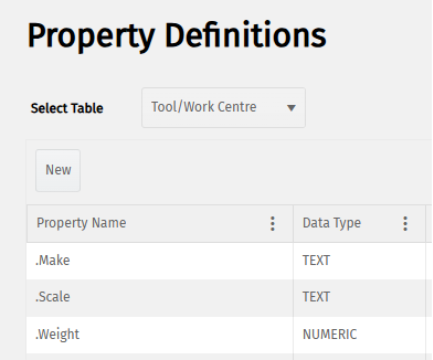
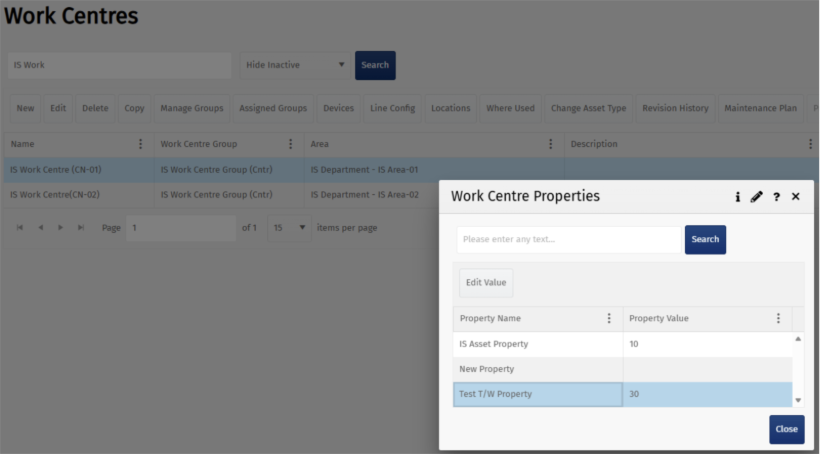
Property Definitions has been extended to include assets. The property, Tool/Work Centre was added to the list of properties. Properties allow you to store additional information that may be useful, e.g., to display in the workstation or use as an additional planning parameter.

Electronic Control History Record
The eCHR continues to be enhanced:
Additional Line Types
The following Line Types were added to the suite of available system line types:
Scrap Available Qty: This caters for the situation where an item is scrapped after production, but before the eCHR is closed. It is triggered by any scrap transaction carried out in available stock while the associated eCHR is open. The following controls apply for different eCHR status:
eCHR Open – scrap of available qty is allowed and recorded.
eCHR Pending Approval – scrap of available qty is blocked (as this affects the qty released section of the regulatory requirements).
eCHR Approved - scrap of available qty is IGNORED (as this does not affect the qty manufactured or released).
Item Adjust Qty WIP: This caters for the scenario where yield is not exactly 100% each time. The trigger is when the item WIP qty is changed while the eCHR is in an Open status only. The trigger could be manual or automatic if the operation is set to allow over/under completion.
Item Note: Allows you to add a note in the eCHR related to the item, for example, an explanation of what happened and what the fix was. This could also be useful in a business continuity planning scenario (e.g., if some work had to be done outside the system for whatever reason, any paperwork generated could be scanned in as an item document, with a full explanation as an item note).
Update Line for Rollbacks in Workflow
When a rollback on an action or an operation is performed, the eCHR Operation Quantity Completion / Action Completion Line is ‘deleted’ (i.e., up-revisioned to have a status ‘deleted’) in the eCHR reports.
ECHR: eSign Profile - History of Revisions
History buttons were added which display history related to eSign Profiles and eSign Requirements.


ECHR Profile - Where Used Button
The Where Used button was added to eCHR Profiles versions to easily see where they’ve been linked to workflows or used on items. The report displays the workflow versions, jobs, and items they’ve been linked to. From this screen you have easy access to Workflow Manager, Item Status, and eCHR Content screens.

Maintenance Date Added to the Tool Use Default eCHR Profile
Most recent maintenance dates were added into the Tools Use Line Type section of the report.
ECHR Content

HTML Report

Completed Qty in eCHR Header
In the past, when an eCHR header was created, we stored Actual Qty as 0 which never changed.
In 9.2, two quantities are displayed in the eCHR header. These are fixed at the point that the ECHR is set to Pending Approval:
Quantity manufactured (with UOM) = Qty in WIP* + Qty Completed
Quantity released for distribution (with UOM) = (Qty in WIP* + Qty Completed) – Available Qty scrapped
*Note: Qty in WIP allows for the scenario where eCHR sign off is embedded within the workflow, i.e., you may have more operations potentially purely logistics type work that are not required to be in the eCHR but are in the workflow.
The metrics above are required within the eCHR and must be accurate when approved. For this reason, any transactions that might change the qty manufactured or qty released are blocked while the eCHR is in a pending approval status.

Issue Line Type Update
In past scenarios if you have multiple items on an eCHR that are all linked to the same issue, this issue would be recorded separately for every item within the eCHR record, e.g., you are making 5 items on a job and realise that one operation instruction is incorrect – you raise an issue linked to the operation node. Previously, this would have generated 5 largely identical issue records for the one issue – one record for each of the 5 items on the eCHR.
For improved readability there is now one record generated for the issue that references all of the linked items.
Further eCHR improvements
The following were also enhanced/added in the eCHR:
eCHR Profile Sections and Configs can be re-ordered for improved control of the layout of reports.
Several improvements were made to the HTML printable report (layout, header formatting, sign off information).
Serial Number Controls
Serial Number uniqueness. There are two different levels of control in the system around serial numbers that have been introduced and controls can be configured on a product-by-product basis using the product property MUST_UNIQUE_SERIAL.
If FALSE – System enforces unique serial number at a product level only i.e. you cannot have the same serial number for two items of the same product but you can use the same serial number for two items that are different products.
If TRUE – Enforces that a serial number must be unique in the system, regardless of the product.
Issues
It is not possible to create an Issue Type that has a QA Hold flag without defining one or more scopes. This makes it easy to identify what is put on hold.
Label Printing
In 9.2, the following enhancements were made to Label Printing:
The label design can only be set to obsolete when all workflow references to it have been disabled (unless the references are disabled). An error is thrown if any active references still exist.
When the print queue is loaded with many jobs, it will order the queue in the following sequence to prevent important jobs from being queued behind ones of less urgency. For example, production jobs waiting for test jobs to complete. The order of importance is:
Production – print jobs generated in the course of a works order.
Inventory – print jobs relating to labelling of inventory in the system.
Admin – print jobs generated by an administrator not relating to specific items.
Test – test print jobs (e.g. for set up of printers).
Material Item Status
It is common in some industries to have a tolerance around a BOM slot qty requirement e.g. for this batch of pastry you need to add a target of 50kg +/- 0.05 kg. In this scenario an operator adding 50.01kg is valid but before 9.2 this would just show as 100% fulfilled rather than 100.02% fulfilled on the item status BOM screen. Item status now shows the correct fulfilment even if it is greater than 100%.
Multi-language
Release report for translations changes
Changes to the translations library in a release will be reported on and included as part of the release documentation pack.
Create translations for en-US language
en_US language is supported as a system language with system translations.
Integrations
Integrations continue to be enhanced:
Starting a New Task triggers an outbound integration, and the workflowtaskid details are captured in the integration log.
Incoming API requests always create an integration log.
Public API
Our Public API was enhanced in 9.2:
Support Raw JSON in Public API
Raw JSON mode returned the expected SQL JSON output, preserved nested arrays, removed escape characters, and did not contain metadata wrapping.
Recipe/List enhancements
1. Request allowed to search by WorkflowType
2. Request allowed to search by IsDefault
3. Request allowed to search by DefaultProductVersion
4. Response returns WorkflowType
5. Response returns IsDefault
6. Response field renamed as DefaultProductVersion
ToolGroup APIs
You can List, Create, Update, Assign to, Remove from Tool Groups through the Public API.

ToolType API
You can upsert, list and delete Tool Types through the Public API.

Tool/List - List by other fields
When using the Tool/List API call, you can list tools based on SUID, Location, Approval Status, and Serial No & ID.
Quality
Quality features were enhanced as follows:
Variable check item templates - UOM and Decimal places
Decimal places and UOM used to be configured against a check item template but sometimes the same check item template could have differing UOM and decimal place requirements dependent on the product (e.g., measure height could be a standard check for a speaker product type but for a travel speaker this could be measured in cm to 2 dp but for an concert speaker this could be metres to 3 dp).
Decimal places and UOM need to be specified against any product specification and the default specification (if used).
If you populate the default specification option when creating a new check item template, this will automatically generate matching product specifications for all products of the product type linked to the template at the time of creation and at creation of any new products of the relevant type. For this reason, you must specify a UOM and DP if creating a default specification to be used as a basis for all subsequent corresponding product specifications.
The function above is now more explicit for a user – there is now a clear warning un the UI against Default Specification stating that the: “creation of this check item template will automatically create a corresponding specification for all existing products of the types specified and will require the specified eSignature permission to complete (if populated above) the specifications for each product will match any default values entered below.”

Assign documents to check result sets
Uploaded documents can be assigned to check results set.
You can view the uploaded documents during the full lifecycle of the item, including when the item is completed to "available" status and the works order is closed.
"Compare" functionality for checklist versions snapshot
Checklist version and history comparisons display the differences between approved, unapproved, and mixed versions, with JSON snapshots generated. You can select two different versions of checklists and click compare to see a JSON comparison of the contents of each to quickly identify differences.


Recovery Mode – Op Qty Completion
The Op Qty Completion (Shared) recovery mode was added. This mode allows you to share recoveries amongst the people who worked on the quantity completed. Recoveries are earned as soon as a quantity for an operation is completed. The recovery is credited to all users who booked activity to the operation since the last quantity completion in proportion to the actual time accrued. The image below describes how recoveries are shared where 3 people worked a total of 20 minutes on the quantity completed.
The total labour minutes recorded between the two partial completions (10 and 25).

The following calculations are based on the diagram above:
Std time/unit = 2 mins/unit
Total recoveries for the 25 items completed = std time * qty complete = 2 * 25 = 50 mins
Recoveries distributed between all the people working on those 25 items are as follows:
Recoveries per person:
Recoveries for person A = (time worked by person A between qty completions) / (total labour for all people between the qty completions) * Total Recoveries
Person A = (7 / (7+10+3)) * 50 = 17.5 mins
Person B = (10 / 20) * 50 = 25 mins
Person C = (3/20) * 50 = 7.5 mins
Reporting
Improvements to the Asset Status Log Screen
With reference to the images below:
Only list assets for which status tracking is enabled in the filter list box.
Excluded the Tool Type ‘Asset’.
Filter list box made wider to accommodate longer names.
FromDT and ToDT columns already available in the grid.
Adjusted WorkCentre mins added to 'Asset Status Log Details' pop-up grid.
Asset selection is blank and not automatically refresh.
Status Class was added as a hidden field in the grid next to the Status column.


Scheduling
When paging was introduced, you had to select ‘All’ in the Page Size field at the bottom of the grid to then filter for jobs with issues.
In 9.2, the 'Orders with Issues Only' checkbox was added to the Schedule Manager search criteria to easily identify only those jobs with issues.

Time and Attendance
In 9.2, when an authorised person makes a change to the start or end of an activity log, you can configure the system to make it mandatory to leave a comment.
In the Application Properties screen, if the ‘REQUIRE_COMMENT_ON_ACTIVITY_LOG’ is set to ‘Yes’, then the reason capture is compulsory, and a reason must be provided in the comments field.
When you click 'Save', a warning pops up that says: “Warning: this change of activity log will change the adjusted labour mins for this activity, any other activity that overlaps this one for the user and any activity logs for other users booked to the same operation at the same time”.


Tools
In 9.2, the tooling functions continued to be enhanced:
Add SUID to Tool Groups
SUID field has been added to Tool Groups to enable better integration with external asset management systems / ERP.
SUID (optional string) is set when adding or editing a Tool Group.
Tool Groups can be listed by SUID through the List API.
Tool Group can be added with a SUID field through the Upsert API.
Workstation
Enforce Planned Work Centre
In 9.2, you can automatically enforce booking onto the planned Work Centre when "Enforce Planned Work Centre" is enabled. This can be configured against the operation node by design or can be managed in the job operation planning screen manually.
In the workstation, if enforcement is turned on, the planned work centre is displayed. If the operator filters for a single work centre it will only display valid jobs for that work centre (i.e., operations that are not enforced and can be done on that work centre, or valid operations that are enforced but have no work centre planned, or operations that are planned to be done on that work centre).
When an operator books onto an operation where the ‘enforce planned work centre’ is enabled and a work centre is planned, the system will bypass the work centre selection pop-up.
Silent Multi Start and Multi Complete
The system has supported multi book on to items for a number of years but this has only previously been available for items that are already started. In 9.2 it is now possible to multi-start items also, i.e., you can multi-select more than one unstarted job (assuming that this is configured as possible for each) and use the multi-book function to start them all at once.
