Versions
Versions this documentation is relevant for:
- 8.7.0+
Material Items are the stock items held in Eyelit MES-M.
GetByFilter
This Endpoint is used to retrieve information related to material items from Eyelit MES-M. Using the MaterialItem -GetByFilter API call has no impact on the data within the given Eyelit MES-M application, it is read-only.
Figure 1 - Logic within MaterialItem -GetByFilter API Call

Data Prerequisites
There is no data required in Eyelit MES-M to act as a pre-requisite to make the API call to list Material Items. If parameters are passed in through the body that return no valid results, an empty payload will be returned.
Request
Table 1 shows the method and endpoint required to make the API call to list Material Items.
Table 1 - Outbound Message Detail for MaterialItem – GetByfilter
Method | URL Structure | Endpoint |
POST | https://[environment].mestec.net | /api/MaterialItem/GetByFilter |
The body of the payload should follow the format below.
JSON Structure for MaterialItem-GetByFilter

See Table 2 for information on which fields are optional, the appropriate data types and the mappings to fields in Eyelit MES-M.
Table 2 - Parameter Information for MaterialItem-GetByFilter
Parameter Name | Data Mapping | Data Type | Mandatory | Case Sensitive | Match Type |
ID | materialitem.id | NUMBER | Yes* | N/A | Exact |
orderNo | schedule.orderno | VARCHAR2(250 BYTE) | Yes* | No | Exact |
Note: For any fields where the match type is ‘Like’, a percent symbol should be used as a wildcard character to indicate a number of characters within the given string.
*GetByFilter requires a parameter and cannot be blank. The Material Item ID is required when getting the information for a specific Material Item. The orderNo is required when filtering by the Schedule Works Order and will return all items for that Works Order. One or the other must be supplied.
Sample Request
See below for sample use cases with examples of the JSON payload format required.
To list a single Material Item:
JSON Sample for MaterialItem -GetByFilter Request A

To list Material Items linked to a Works Order:
JSON Sample for MaterialItem- GetByFilter Request B

Response
When using the MaterialItem - GetByFilter API call, if any data has been found in Eyelit MES-M that meets the parameter values passed in the original payload, a JSON payload will be returned containing data in the following structure:
JSON Structure for MaterialItem -GetByFilter

Sample Response
See below for sample use cases with examples of the JSON payload format returned.
No results were found that matched given parameters:
JSON Sample for MaterialItem -GetByFilter Response A

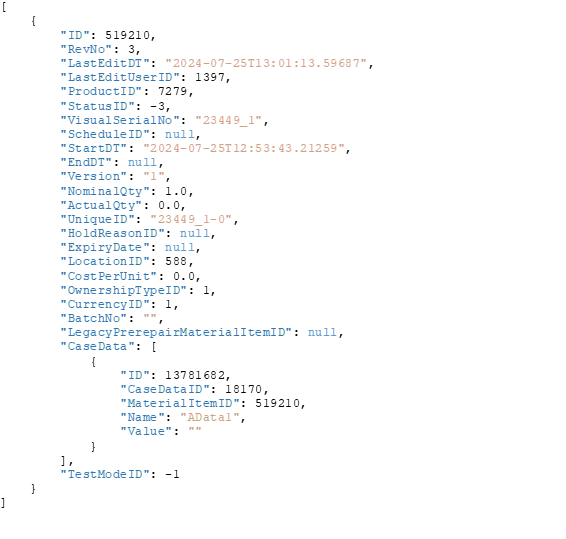
Material Item found that matched given parameters:
JSON Sample for MaterialItem-GetByFilter Response B
 Update
This endpoint allows for the update of an existing material item within Eyelit MES-M.
Figure 2 - Logic within MaterialItem-Update/{id} API Call

Data Prerequisites
The material item being updated must exist in Eyelit MES-M, this transaction is not capable of creating an item.
Request
Table 3 shows the method and endpoint required to make the API call to Update a Material Item. Note that this transaction requires the ID of the material item to be included in the endpoint URL.
Table 3 - Outbound Message Detail for Material Item - Update/{id}
Method | URL Structure | Endpoint |
PUT | https://[environment].mestec.net | /api/MaterialItem/Update/{id} |
The body of the payload should follow the format below.
 See Table 4 for information on which fields are optional, the appropriate data types and the mappings to fields in Eyelit MES-M.
Table 4 - Parameter Information for Material Item – Update/{id}
Parameter Name | Data Mapping | Data Type | Mandatory | Case Sensitive | Match Type |
Id | materialItem.id | NUMBER(10,0) | Yes | N/A | Exact |
revNo | materialitem.revNo | NUMBER | Yes | N/A | N/A |
lastEditDT | materialItem.lastEditDT | TIMESTAMP(6) | Yes | N/A | N/A |
lastEditUserID | materialItem.lastEditUserID | NUMBER(10,0) | Yes | N/A | Exact |
productID | materialItem.productID | NUMBER(10,0) | Yes | N/A | Exact |
statusID | materialItem.statusID | NUMBER(10,0) | Yes | N/A | Exact |
visualSerialNo | materialItem.visualSerialNo | VARCHAR2(100) | Yes | N/A | N/A |
scheduleID | materialItem.scheduleID | NUMBER(10,0) | Yes | N/A | Exact |
startDT | materialItem.startDT | TIMESTAMP(6) | Yes | N/A | N/A |
endDT | materialItem.endDT | TIMESTAMP(6) | Yes | N/A | N/A |
version | materialItem.version | VARCHAR2(50 | Yes | N/A | N/A |
nominalQty | materialItem.nominalQty | FLOAT(93) | Yes | N/A | N/A |
actualQty | materialItem.actualQty | FLOAT(93) | Yes | N/A | N/A |
uniqueID | materialItem.uniqueID | VARCHAR2(100) | Yes | N/A | N/A |
holdReasonID | materialItem.holdReasonID | NUMBER(10,0) | Yes | N/A | Exact |
expiryDate | materialItem.expiryDate | TIMESTAMP(6) | Yes | N/A | N/A |
locationID | materialItem.locationID | NUMBER(10,0) | Yes | N/A | Exact |
costPerUnit | materialItem.costPerUnit | FLOAT(93) | Yes | N/A | N/A |
ownershipTypeID | materialItem.ownershipTypeID | NUMBER(10,0) | Yes | N/A | Exact |
currencyID | materialItem.currencyID | NUMBER(10,0) | Yes | N/A | Exact |
batchNo | materialItem.batchNo | VARCHAR2(50) | Yes | N/A | N/A |
legacyPrerepairMaterialItemID | materialItem. legacyPrerepairMaterialItemID | NUMBER(10,0) | Yes | N/A | Exact |
caseData | JSON Array | N/A | Yes | N/A | N/A |
id | caseDataItem.id | NUMBER(10,0) | Yes | N/A | Exact |
caseDataID | caseDataItem.caseDataID | NUMBER(10,0) | Yes | N/A | Exact |
materialItemID | caseDataItem.materialItemID | NUMBER(10,0) | Yes | N/A | Exact |
name | caseData.name | VARCHAR2(50) | Yes | No | Exact |
value | caseDataItem.value | VARCHAR2(2000) | Yes | N/A | N/A |
testModeID | materialItem.testModeID | NUMBER(10,0) | Yes | N/A | Exact |
Note: For any fields where the match type is ‘Like’, a percent symbol should be used as a wildcard character to indicate a number of characters within the given string.
Sample Request
See below for sample use cases with examples of the JSON payload format required.
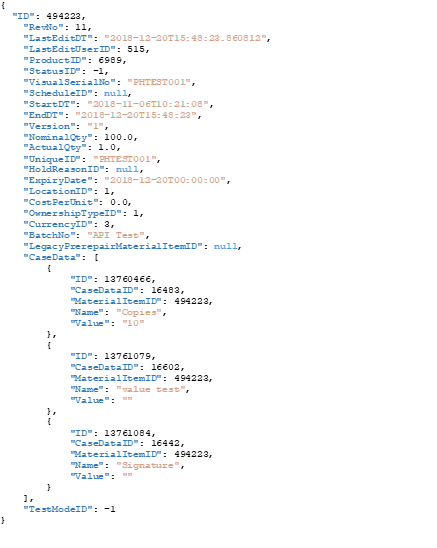
Please not that this endpoint requires all fields to be passed in for an update.
The recommended approach is to use the getbyfilter transaction to return the structure for the item that needs to be updated, then pass the full structure into the update transaction with the required data modifications.
To update.
Response
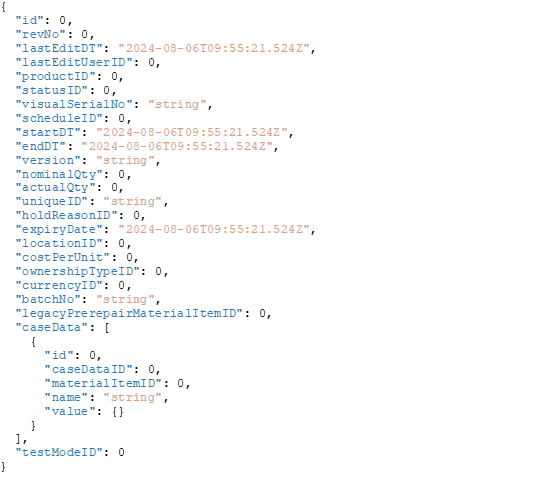
When using the Material Item-Update/{id} API call, if a material item has been updated a JSON payload will be returned containing data in the following structure:
 Sample Response
See below for sample use cases with examples of the JSON payload format returned.

Get/{id}
This Endpoint is used to retrieve information related to material items from Eyelit MES-M. Using the MaterialItem -Get/{id} API call has no impact on the data within the given Eyelit MES-M application, it is read-only.
Figure 3 - Logic within MaterialItem -Get/{id} API Call

Data Pre-Requisites
There is no data required in Eyelit MES-M to act as a pre-requisite to make the API call to list Material Items. If parameters are passed in through the body that return no valid results, an empty payload will be returned.
Request
Table 5 - Outbound Message Detail for MaterialItem – Get/{id} shows the method and endpoint required to make the API call to list Material Items. Note that this transaction required the ID of the material item to be included in the endpoint URL
Table 5 - Outbound Message Detail for MaterialItem – Get/{id}
Method | URL Structure | Endpoint |
GET | https://[environment].mestec.net | /api/MaterialItem/Get/{id} |
Response
When using the MaterialItem – Get/{id} API call, if any data has been found in Eyelit MES-M that meets the id values passed in the original payload, a JSON payload will be returned containing data in the following structure:
JSON Structure for MaterialItem -Get/{id}

Sample Response
See below for sample use cases with examples of the JSON payload format returned.
No results were found that matched given parameters:
JSON Sample for MaterialItem -Get/{id}

The response contains empty square brackets
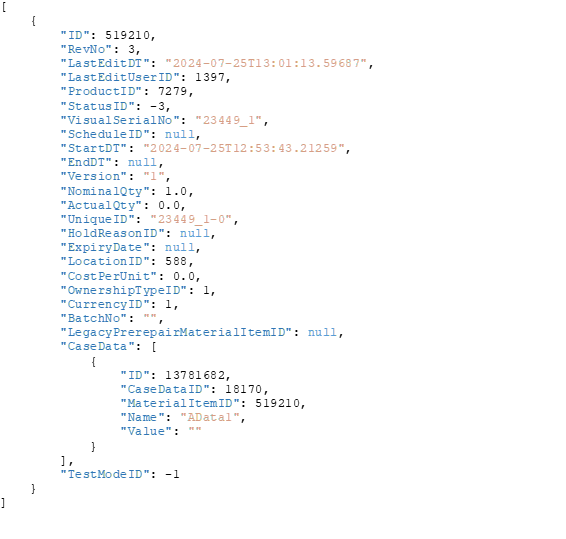
Material Item found that matched given id:
JSON Sample for MaterialItem-Get/{id} Response
 Receive
This Endpoint is used to receive a new material item into the stock.
Figure 4 - Logic within MaterialItem -Receive API Call

Data Prerequisites
A receive transaction in Eyelit MES-M is performed against a Product. The product name must be included in the payload. This means that a product must be available in Eyelit MES-M before the Material received.
Request
Table 6 shows the method and endpoint required to make the API call to receive material.
Table 6 - Outbound Message Detail for MaterialItem –Receive
Method | URL Structure | Endpoint |
POST | https://[environment].mestec.net | /api/MaterialItem/Receive |
The body of the payload should follow the format below.
JSON Structure for MaterialItem-Receive
 See Table 7 for information on which fields are optional, the appropriate data types and the mappings to fields in Eyelit MES-M.
Table 7 - Parameter Information for MaterialItem/Receive
Parameter Name | Data Mapping | Data Type | Mandatory | Case Sensitive | Match Type |
productName | Product.name | VARCHAR2(50) | Yes | No | Exact |
visualSerialNo | materialitem.visualserialno | VARCHAR2(250 BYTE) | Yes | No | Exact |
expiryDate | materialitem.expirydate | VARCHAR2(100 BYTE) | No | No | Exact |
version | materialitem.version | VARCHAR2(100 BYTE) | No | No | Exact |
location | location.suid | VARCHAR2(200 BYTE) | No | N/A | N/A |
batchNo | materialitem. batchno | VARCHAR2(50 BYTE) | No | N/A |
|
costPerUnit | materialitem.costperunit |
| No | N/A |
|
qty | Materialitem.nominalqty | FLOAT | Yes | N/A |
|
ownershipType | Ownershiptype.name | VARCHAR2(250 BYTE) | No | No | Exact |
comment |
|
| No | N/A |
|
deliveryNo |
|
| No | N/A |
|
Sample Request
See below for sample use cases with examples of the JSON payload format required.
To receive Material Item:

Response
When using the MaterialItem – Receive API call, material item stock is created, a JSON payload will be returned containing data in the following structure:
JSON Structure for MaterialItem -Receive

Sample Response
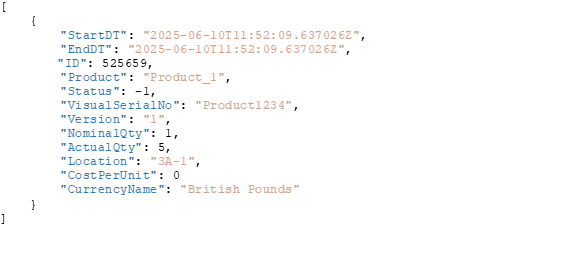
See below for sample with examples of the JSON payload format returned.
JSON Sample for MaterialItem-Receive
 ItemAdjust
This Endpoint is used to adjust the quantity of an existing material item.
Figure 5 - Logic within MaterialItem -ItemAdjust API Call

Data Prerequisites
A ItemAdjust transaction in Eyelit MES-M is performed against a MaterialItemid. The MaterialItem id must be included in the payload. This means that a Material item must be available in Eyelit MES-M before the item adjust.
Request
Table 8 - Outbound Message Detail for MaterialItem –ItemAdjuste shows the method and endpoint required to make the API call to receive material.
Table 8 - Outbound Message Detail for MaterialItem –ItemAdjust
Method | URL Structure | Endpoint |
POST | https://[environment].mestec.net | /api/MaterialItem/ItemAdjust |
The body of the payload should follow the format below.
JSON Structure for MaterialItem-ItemAdjust

See Table 9 for information on which fields are optional, the appropriate data types and the mappings to fields in Eyelit MES-M.
Table 9 - Parameter Information for MaterialItem/ItemAdjust
Parameter Name | Data Mapping | Data Type | Mandatory | Case Sensitive | Match Type |
materialitemid | Materialitem.id | NUMBER(10,0) | Yes | No | Exact |
adjustqty | Materialitem.actualqty | Number | Yes | N/A |
|
reasonSUID | Materialreason. materialreasonsuid | VARCHAR2(50 BYTE) | Yes | No | Exact |
comments |
|
| No | No |
|
Sample Request
See below for sample use cases with examples of the JSON payload format required.
To adjust Material Item:

Response
When using the MaterialItem – Item Adjust API call, material item quantity is adjusted, a JSON payload will be returned containing data in the following structure:
JSON Structure for MaterialItem -ItemAdjust

Sample Response
See below for sample with examples of the JSON payload format returned.
JSON Sample for MaterialItem-ItemAdjust

